


































Key Takeaways
- Know where to focus the moment you log in, with a new IO Home page that’s the latest in a series of usability upgrades.
- See the risks that need your attention first, pulled together from every register you have access to.
- Track your progress to certification across every framework, and stay ahead of deadlines with a Schedule you can filter by task type.
- Arrange your Home page around the way you work.
A Home Page That Shows You Where to Start
Working closely with customers, we’ve made your IO Home page even more useful, so you can hit the ground running as soon as you log in.
Whether it’s an approval waiting on you, a risk that’s been treated but hasn’t reduced, or a quick check on how close you are to certification, your priorities are now front and centre.
Even better, you can set up your Home page around the way you work, without changing the view for your colleagues.
Let’s dive into what’s changed.
Spot Priority Risks Across Every Register
Your Home page now brings together the risks that need your attention from every register you have access to, so you can see where to act first. These include:
- Risks overdue or coming up for review, so you know where to focus.
- Risks with no linked controls, so you can put measures in place to manage them.
- Treated risks whose score isn’t coming down, so you can re-visit treatments that aren’t working.
With priority risks surfaced in one view, you can catch issues early and continue strengthening your organisation’s resilience, not just in the run-up to an audit.
This is the first step towards something bigger: one unified management system, with every type of risk in a single view. More on that below.
Know Where You Stand, and What’s Due
Two further updates help you get straight to the work that counts.
See How Close You Are to Certification
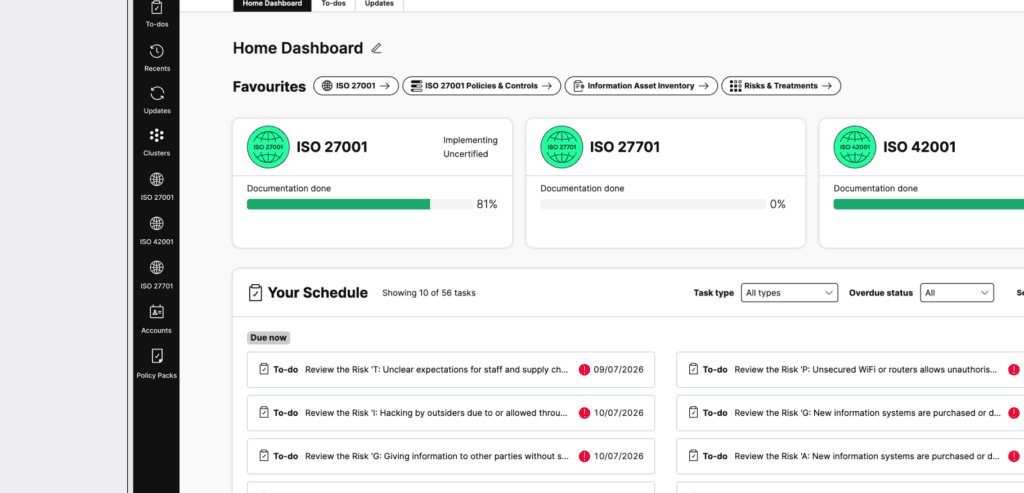
Framework progress gives you a live read on where each framework stands, including certification status where relevant. It’s the quickest way to check your progress across every framework.
Never Get Caught Out by a Deadline
Deadlines are where compliance can get stressful. Your Schedule lines up everything by due date, so nothing sneaks up on you. When you want to focus on one thing, like clearing your approvals, you can filter by task type to see only what you need.
Make IO Work the Way You Do
Your Home Page, Your Layout
Make your Home page your own. Focus on the areas you use the most and hide the bits you don’t. Hit Edit next to the page title, and:
- Reorder or hide entire sections, so what matters most to you sits at the top.
- Reorder or hide individual frameworks, so your view stays clean and focused on the standards you’re actively working on.
Best of all, your layout is yours alone. Heading for an audit? Put certification status front and centre. Spend your day signing things off? Place your Schedule at the top. Everyone on your team can set up their own Home page without changing anyone else’s.
Your Frameworks, One Click Away
Your custom frameworks now sit in your left navigation by default, right alongside your designated frameworks. Show, hide and reorder them from Edit Navigation, and keep the ones you use the most a click away.
Is ISMS.online Easy to Use?
We’ve been steadily improving how IO looks and works, and there’s plenty more to come. Since December 2025, we’ve introduced a new left-hand navigation, cleaner header menus and a refreshed tab style. The updated IO Home page is the latest step.
| When | What changed | What it means for you |
| October | Personalised Home page, a priority risks view, and custom frameworks in the navigation. | Your most important work is the first thing you see |
| March 2026 | Cleaner header menus and a refreshed tab style | Less visual clutter and a smoother path through your work |
| December 2025 | A new left-hand navigation | To-dos, Updates, Frameworks and Policy Packs, all in one place |
What’s Next for IO?
Something big is coming soon. We’re building one unified management system, where each new framework plugs straight into the controls and evidence you already have, and every type of risk can be seen in a single view. We’re testing it with a small group of pioneer customers right now, so if you’d like to know more, have a chat with your Customer Success Manager.
In the meantime, watch this space for even more Home page improvements. We’ll be putting incidents, assets and audits within closer reach, and adding enhanced risk filtering so you can zero in on different types of risk across your organisation, all in one place.
Get Started Today
Already using IO? Hit Edit next to your Home page title and set it up just how you like it. You’ll feel the difference every time you log in.
New to IO? Book a demo and we’ll happily show you around.