





































Why is Cyber Essentials a good fit for small businesses?
Cyber Essentials was designed with smaller organisations in mind. It is a UK Government–backed scheme delivered by the IASME Consortium that focuses on five technical controls every business should already have in place. There are no lengthy audits, no requirement for a dedicated information security team and no documentation marathons. For a UK SME that simply wants to prove it has the basics right, the certification is one of the most cost-effective credentials available.
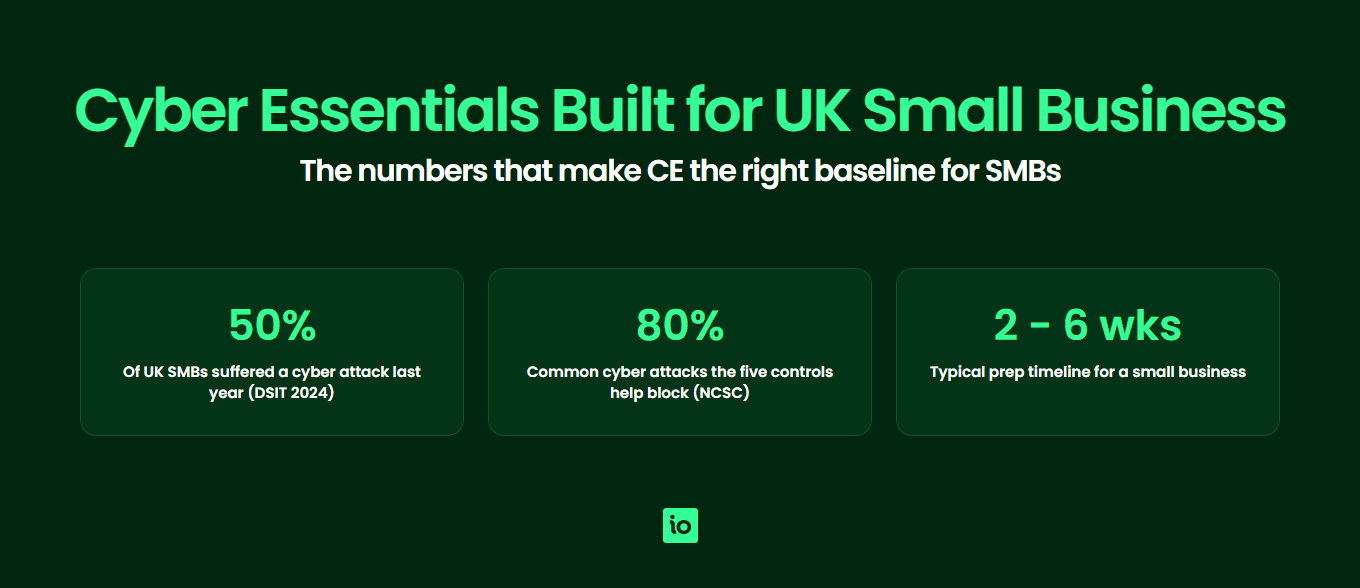
For a sole trader or a 20-person consultancy, the appeal is practical. The five controls cover firewalls, secure configuration, user access control, malware protection and security update management — the same hygiene measures that prevent the majority of opportunistic attacks. Coverage of the basics blocks an estimated 80 percent of common cyber attacks, which is exactly what small businesses face most frequently. You do not need to build an ISO 27001-grade management system to qualify; you just need to demonstrate that the controls work.
The scheme is also explicitly scaled for size. Pricing is tiered so that a micro business with fewer than 10 employees pays a fraction of what a 250-person company pays, and the self-assessment questionnaire is the same regardless of headcount. That makes it accessible to founders running a business from a laptop and small operators alike. For broader context on the full scheme, see the Cyber Essentials hub.
What is driving small businesses to certify in 2026?
Three pressures dominate. First, UK Government procurement increasingly mandates Cyber Essentials for any supplier handling sensitive or personal information. If you bid for central government, NHS, MOD or local authority contracts, Cyber Essentials is typically a baseline requirement and frequently a hard pass-or-fail criterion at the procurement stage. Many councils now require it for any contract involving citizen data, no matter how small the contract value.
Second, supply chain pressure has intensified. Large enterprise customers — banks, insurers, professional services firms, retailers — are pushing Cyber Essentials down through their supplier base as part of their own third-party risk programmes. SMEs who supply to large organisations are increasingly being asked to provide evidence of certification before contracts are awarded or renewed. Failure to certify can mean losing existing business, not just missing new opportunities.
Third, the cyber insurance market has hardened. Underwriters now ask detailed questions about controls during quotation, and several major UK insurers explicitly reduce premiums or improve coverage terms for Cyber Essentials certified businesses. For an SME already paying for annual cyber cover, even a modest premium reduction can offset much of the certification cost in year one. For a fuller cost-benefit view, our guide on whether Cyber Essentials is worth it walks through the numbers.
What does Cyber Essentials actually require from an SME?
The standard sets out five technical control areas. The 2022 scheme update brought home working, cloud services and BYOD firmly into scope, which is exactly how most small businesses now operate.
- Firewalls — Boundary firewalls and personal firewalls on devices that connect to untrusted networks (including home routers used by remote workers).
- Secure configuration — Devices and software configured to reduce vulnerabilities. Default passwords removed, unused accounts disabled, unnecessary services switched off.
- User access control — Each user has their own account, administrators have separate admin accounts, multi-factor authentication on cloud services and any externally accessible service.
- Malware protection — Anti-malware on every endpoint, kept current. Application allow-listing or sandboxing as alternatives for managed devices.
- Security update management — All software supported by the vendor, high and critical patches applied within 14 days.
None of these are exotic. Most SMEs running Microsoft 365 or Google Workspace with managed laptops are already 60 to 80 percent of the way there before they even start the assessment. The challenge is usually evidence and consistency rather than missing controls outright.

Get started easily with a personal product demo
One of our onboarding specialists will walk you through our platform to help you get started with confidence.
How much does Cyber Essentials cost a small business?
The IASME Consortium sets the basic Cyber Essentials assessment fee, and it scales with the size of your organisation, so smaller businesses pay materially less than larger ones. The smallest organisations fall into the lowest band, which is why Cyber Essentials is realistically affordable for a startup or micro business.
The table below summarises the size bands. Because IASME reviews its pricing periodically, always check the official IASME website for the current fees before budgeting.
| Size band | Typical headcount | Who this suits |
|---|---|---|
| Micro | Up to 9 employees | Sole traders, founders, startups, freelance consultancies |
| Small | 10 to 49 employees | Growing SMEs, agencies, small professional services firms |
| Medium | 50 to 249 employees | Established SMEs and scale-ups |
| Large | 250+ employees | Enterprise organisations |
The assessment fee is only the certification body charge. Real-world budget should also include preparation time (typically 20 to 40 hours of internal effort for an SME) and any tooling you may need to deploy, such as endpoint anti-malware or an MFA solution if you do not already have one. Many small businesses with modern cloud-based stacks find the only additional cost is the assessment fee itself. For a detailed breakdown including consultant rates, see our Cyber Essentials cost guide.
How should a small business scope its Cyber Essentials assessment?
Scope is the single most important decision an SME makes during the assessment. Get it right and the process is straightforward; get it wrong and you waste time providing evidence for systems that should not have been in scope, or worse, you exclude something that should have been in scope and risk a failed assessment.
The default expectation is that the entire organisation is in scope. Whole-organisation certification is what most enterprise procurement teams expect to see and what most insurers want to verify. For a small business, scoping out parts of the organisation is rarely worth the complexity unless there is a clear, segregated environment that genuinely cannot be brought up to standard quickly.
| SME scope consideration | What is in scope | Common SME approach |
|---|---|---|
| Home working devices | Any device used to access organisational data, including BYOD if not segregated | Issue managed laptops or enrol personal devices in MDM with conditional access |
| Home routers | In scope as boundary firewalls if used to access work data, unless a software firewall on the device is configured to standard | Rely on the device firewall (e.g. Windows Defender Firewall) to remove home router from scope |
| Microsoft 365 / Google Workspace | All cloud services that hold organisational data are in scope | Enforce MFA on all admin and user accounts, document the configuration |
| SaaS tools (CRM, accounting, project management) | In scope if they hold organisational or customer data | Enable MFA, restrict admin access, list each system in the asset register |
| Mobile phones | In scope if used to access email or business data | Require PIN or biometric lock, enable remote wipe via M365 or Google admin |
| Personal devices (BYOD) | In scope whenever they access organisational data; explicitly within scope since the 2022 update | Either bring under MDM or restrict BYOD to web-based access only with no local data |
| Contractors and freelancers | In scope if they use your devices or access your data through your accounts | Issue them organisation accounts with the same controls, or have them use their own certified setup |
Modern cloud working actually helps small businesses certify. Because Microsoft 365 and Google Workspace centralise identity, MFA and device policy, a small business can demonstrate consistent controls across all users from a single admin console — far easier than auditing a mixed estate of on-premise servers. Before submitting, run through the self-assessment questionnaire as a dry run to spot scope and evidence gaps early.

Free yourself from a mountain of spreadsheets
Embed, expand and scale your compliance, without the mess. IO gives you the resilience and confidence to grow securely.
Should an SME use a consultant or go it alone?
For the basic Cyber Essentials self-assessment, most small businesses can complete it in-house without a consultant. The questionnaire is plainly written, the IASME guidance is comprehensive and the controls map cleanly onto the kind of Microsoft 365 or Google Workspace stack that the typical UK SME already runs. A founder, IT manager or operations lead can usually drive the project to completion in two to six weeks of part-time effort.
Consultants make sense in three situations. The first is when you have no in-house technical capability and want someone to map your existing setup to the controls and tell you what needs to change. The second is when you are pursuing Cyber Essentials Plus (the audited version with an external technical assessment) and want help preparing the environment. The third is when you have a complex or mixed environment — legacy on-premise systems, multiple offices, niche industrial equipment — where scoping decisions need expert input.
Consultant fees vary widely with scope and the consultant’s experience. For most small businesses, that money is better spent on tooling (MFA, anti-malware, MDM) than on advisory time. The exception is Plus, where a half-day or one-day engagement to walk through the external test scope can be valuable.
What is a realistic timeline for a small business?
Most SMEs are ready to submit within two to six weeks of starting. The variation depends almost entirely on the gap between current state and the five controls. A small business already running Microsoft 365 with MFA, managed laptops and automatic Windows Update enabled can complete the questionnaire in days. A business that needs to roll out MFA, replace an out-of-support operating system or introduce anti-malware on the fleet should plan for several weeks.
A realistic plan looks like this. Week one: read the question set, list your devices and cloud services, identify any obvious gaps. Weeks two to four: close gaps — enable MFA everywhere, patch any out-of-support software, document your configuration. Week five: complete the questionnaire and gather supporting evidence. Week six: submit and receive the certificate (usually within three working days of submission if there are no follow-up questions). The standard certificate is valid for 12 months. For a deeper breakdown by activity, see our guide on how long Cyber Essentials takes.
What are the common pitfalls small businesses run into?
Five issues account for the majority of SME failures and resubmissions. None of them are technical reinvention — they are scoping and evidence problems that catch businesses out when they treat the assessment as a tick-box exercise rather than a snapshot of how they actually operate.
- Out-of-support software — Any operating system, browser or business application that is past its vendor end-of-support date is an automatic fail. Run an audit of Windows versions, Office builds, macOS versions and any niche line-of-business software before you submit. Replace or upgrade anything past end-of-life.
- MFA gaps — Multi-factor authentication must cover all admin accounts and all cloud services accessible from the internet. The common SME miss is a legacy email forwarding account, a CRM admin login or a finance system that quietly never had MFA turned on.
- BYOD assumptions — A surprising number of small businesses assume that if a device belongs to an employee, it is out of scope. It is not. If a personal phone or laptop touches organisational data, it is in scope and must meet the controls.
- Patch lag — The 14-day rule for high and critical patches applies to operating systems and to all installed applications. A business that patches Windows automatically but leaves third-party browsers and PDF readers stale will fail. Use a patch management tool or a managed services partner if manual tracking is unrealistic.
- Evidence weakness — The assessor is looking for proof, not assurances. Screenshots of MFA settings, exports of patch reports, a written acceptable use policy that staff have acknowledged, an asset register that matches reality. SMEs that treat evidence-gathering as the final step rather than the foundation of the assessment lose time chasing artifacts after submission.
Most of these can be designed out from day one if you start with a platform that prompts for evidence against each control, rather than waiting until submission week.
What is the cyber insurance benefit for SMEs?
For eligible UK micro and small businesses, the basic Cyber Essentials certificate includes cyber liability insurance as part of the package, provided the whole organisation is in scope and you meet IASME’s UK turnover eligibility criteria (confirm the current criteria and cover levels with IASME). The cover is automatically activated for UK-domiciled businesses that meet the criteria, with no separate underwriting required. While the cover is modest, it is genuinely useful for sole traders and micro businesses who would otherwise carry no cyber insurance at all.
Beyond the included cover, certified businesses negotiate better terms with mainstream cyber insurers. Underwriters view the certificate as evidence that core hygiene is in place, which lowers their assessed risk. Premium reductions on standalone cyber policies are common, and can be greater for SMEs that pair Cyber Essentials with sensible additional measures like backup testing and an incident response plan. The maths usually means the assessment pays for itself in year one through insurance savings alone.
Why Choose ISMS.online for Small Business Cyber Essentials?
ISMS.online takes the friction out of preparing for and maintaining Cyber Essentials, so a small team can run the whole project without specialist headcount.
- SME-friendly pricing — ISMS.online is built to scale down as well as up, so a 5-person business pays for what it needs without enterprise tooling overhead.
- Pre-mapped Cyber Essentials controls — The five control areas are pre-loaded with practical guidance, evidence prompts and example policies you can adapt in minutes rather than write from scratch.
- Evidence library — Upload, version and link every piece of evidence (MFA screenshots, patch reports, configuration baselines) to the relevant control so the assessor has a clear audit trail.
- Asset and device register — Track every laptop, mobile and cloud service in scope, including BYOD and contractor devices, with status indicators that flag anything out of policy.
- Policy templates included — Acceptable use, password and access, bring your own device, patch management and incident response policies are all included as editable templates.
- Annual renewal made simple — The platform tracks your renewal date, reminds you of what has changed and lets you reuse evidence rather than start the questionnaire from scratch each year.
- Path to ISO 27001 when ready — When you outgrow Cyber Essentials and your customers start asking for ISO 27001 or SOC 2, the work you have already done in ISMS.online carries straight over — no replatforming, no re-documenting.
Related Cyber Essentials guides
Continue your Cyber Essentials journey with the other guides in this series:
- Cyber Essentials Requirements — The five control areas, scope decisions and what evidence assessors look for.
- Cyber Essentials Cost — What drives Cyber Essentials cost, Plus pricing factors and how to budget.
- Is Cyber Essentials Worth It? — An honest assessment of the benefits, drawbacks and who actually needs certification.
- Cyber Essentials Plus Requirements — The technical audit, vulnerability scans and what Plus delivers over the basic certification.
- Cyber Essentials Self Assessment — The SASQ workflow, scope, evidence and common pitfalls.
- How Long Does Cyber Essentials Take? — Typical UK timeline, fast-track options and what slows the process.
- Cyber Essentials Renewal — The 12-month cycle, control changes and how to prepare ahead of expiry.
- Cyber Essentials vs ISO 27001 — Scope, cost, time and recognition compared.
FAQs
Is Cyber Essentials mandatory for small businesses in the UK?
Cyber Essentials is not a general legal requirement, but it is mandatory for many UK government contracts where the supplier handles sensitive or personal information. Increasingly, it is also required by enterprise customers as part of their supply chain risk programmes. If you sell to government or to large organisations, treat it as commercially mandatory even though it is not legally compulsory.
What does Cyber Essentials cost for a startup or sole trader?
Sole traders and the smallest businesses fall into IASME’s lowest (micro) size band, so they pay the least — check the official IASME website for the current fee. If your existing stack already supports MFA and automatic updates, the assessment fee may be your only direct cost. Cyber Essentials Plus, which adds an external technical audit, costs significantly more and is priced separately by your certification body according to the size and complexity of your environment.
How long does it take a small business to get certified?
Most SMEs complete basic Cyber Essentials in two to six weeks. Businesses already running modern cloud services with MFA enabled may finish in a week. Businesses that need to roll out MFA, replace unsupported software or introduce anti-malware should plan for the full six weeks. Once submitted, the certification body typically returns a decision within three working days.
Does Cyber Essentials cover home working and BYOD?
Yes. Since the January 2022 scheme update, home working devices and personal BYOD devices used to access organisational data are explicitly in scope. The most common SME approach is to either issue managed laptops or to require personal devices to be enrolled in mobile device management with conditional access. Home routers can usually be taken out of scope by relying on the software firewall on each device.
Do I need a consultant or can I do it myself?
Most small businesses can complete the basic Cyber Essentials self-assessment without a consultant. The questionnaire is written in plain English and the IASME guidance is detailed. Consider a consultant if you have no technical lead, if you are aiming for Cyber Essentials Plus, or if you have a complex environment with legacy systems or multiple offices. Using a platform like ISMS.online with pre-mapped controls and policy templates means most SMEs save the consultant fee entirely.
Will Cyber Essentials reduce my cyber insurance premium?
Often, yes. Eligible UK micro and small businesses automatically receive included cyber liability insurance as part of the basic Cyber Essentials certificate, subject to IASME’s UK turnover eligibility criteria. Beyond that, mainstream cyber insurers typically offer premium reductions on standalone policies for certified businesses. The insurance savings alone often offset the assessment fee in year one.






