





































What is the Cyber Essentials self assessment?
The Cyber Essentials self assessment is the questionnaire that sits at the heart of the UK Government’s Cyber Essentials scheme. Administered on behalf of the National Cyber Security Centre (NCSC) by IASME, it asks your organisation to declare, in writing, that you have implemented five sets of technical controls to a level that defends against the most common internet-based attacks. A senior person at board level signs off your answers, you submit the questionnaire through the IASME portal, and an assessor reviews your responses and awards (or withholds) certification.
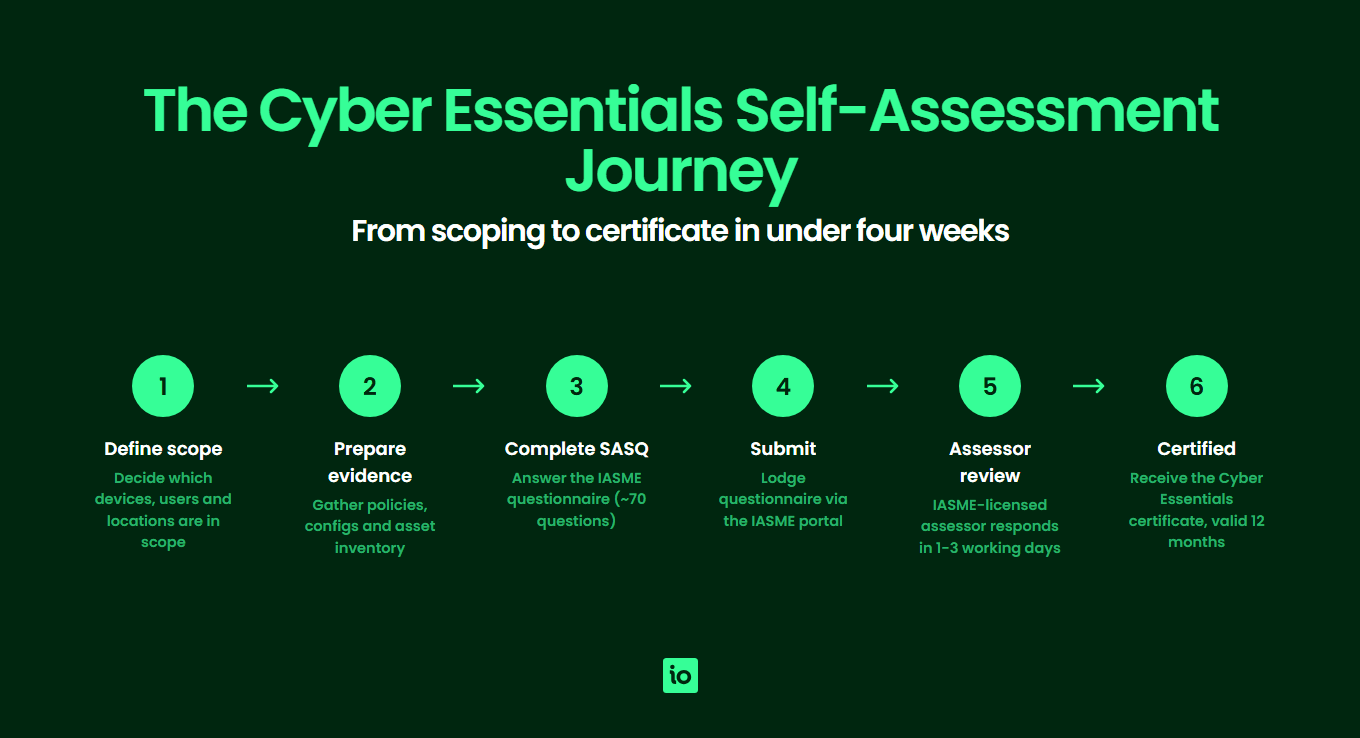
Although it is called a “self” assessment, the process is not informal. Your declaration is a contractual statement to a certification body, and the assessor will reject answers that lack the right detail or contradict your stated scope. Most failed first attempts come from rushed, untested answers rather than missing controls, so the goal of this guide is to help you prepare evidence, scope your environment correctly and answer with the precision the IASME assessor is looking for. For the underlying technical baseline you are declaring against, see our explanation of the Cyber Essentials requirements. Before opening the SAQ itself, work through our Cyber Essentials checklist to confirm scope, evidence and controls are ready — it is designed to catch the same gaps an assessor will flag.
The questionnaire contains around 80 questions across the five control areas. Each question is binary — you either meet the control or you do not — but most questions also require a short written explanation describing how you meet it. ISMS.online stores your answers, evidence and rationale in one place so you can re-use them at renewal and during a Cyber Essentials Plus audit.
How is the self assessment structured?
The questionnaire is split into three logical parts. Getting the structure right in your head before you start makes the answering process far quicker.
- Company information and scope — Legal entity, sector, size, location and a written description of what is in and out of scope. This drives every answer that follows.
- Insurance declaration — A few questions covering the included cyber insurance for eligible UK-domiciled organisations (subject to IASME’s turnover criteria).
- Technical controls — The bulk of the questionnaire. Around 80 questions grouped under the five control themes. Each theme tests a different layer of your environment.
Crucially, your answers in the technical controls section must apply to everything in your stated scope. If you exclude part of the business, you must say so clearly and ring-fence it. Partial answers are the single largest cause of resubmission, alongside unsupported software in scope.

Free yourself from a mountain of spreadsheets
Embed, expand and scale your compliance, without the mess. IO gives you the resilience and confidence to grow securely.
What are the five control areas and what does each ask?
The five technical control themes are the same whether you go for Cyber Essentials or Cyber Essentials Plus. The difference is that Plus adds an independent on-site or remote technical audit; the self assessment is the foundation underneath it. The table below summarises what each control area covers and the kind of questions you should expect.
| Control Area | What It Covers | Example Questions |
|---|---|---|
| 1. Firewalls and Internet Gateways | Boundary firewalls protecting your office network, plus host-based firewalls on devices used outside the office (e.g. home working or hot-desks). | Do you change default firewall passwords? Are inbound rules documented, approved and reviewed? Are administrative interfaces blocked from the internet or protected by multi-factor authentication? |
| 2. Secure Configuration | Removing default accounts, unused software and unnecessary services from servers, end-user devices, mobile devices and cloud services. | Have you removed or disabled unused user accounts? Have default passwords on all in-scope devices been changed? Is auto-run disabled? Are device unlock credentials at least 6 characters with brute-force protection? |
| 3. User Access Control | Account creation, privilege management, separation of admin and standard accounts, and multi-factor authentication on cloud services. | Is there a documented user account approval process? Are administrative accounts only used for admin tasks? Is MFA enabled on all cloud services for users and administrators? Are leavers’ accounts removed promptly? |
| 4. Malware Protection | Anti-malware, application allow-listing or sandboxing across all in-scope devices, including BYOD and mobile. | Which malware protection mechanism is in use on each device type? Are signatures updated daily? Are users prevented from running software from untrusted sources? |
| 5. Security Update Management | Patching of operating systems, applications and firmware within defined timeframes; removal of unsupported software. | Is automatic updating enabled where possible? Are high-risk and critical updates applied within 14 days of release? Is any software in use that is no longer supported by the vendor? |
How do you define your scope correctly?
Scope is the most common reason organisations fail or have to redo questions, so it pays to be deliberate. Your scope must cover the parts of your organisation through which an attacker could realistically reach your sensitive data. The default and strongly preferred option is “whole organisation”, but you may scope by business unit if you can demonstrate clear technical and physical separation between the in-scope and out-of-scope parts.
Whichever option you choose, you need to be able to describe and evidence:
- Users in scope — All employees, contractors and third parties with access to in-scope systems, including remote workers. Customer accounts on your own services are out of scope.
- Devices in scope — All laptops, desktops, tablets, mobile phones and servers used to access organisational data or services, including personally owned devices (BYOD) used for work email or files.
- Locations in scope — Offices, home working setups and any data centres or co-location facilities you operate.
- Cloud services in scope — All Software-as-a-Service, Platform-as-a-Service and Infrastructure-as-a-Service that holds organisational data. Since the 2022 update, cloud is explicitly in scope and cannot be excluded.
Document the scope in plain English before you answer any technical questions. If you cannot describe the boundary precisely, the assessor will not be able to confirm whether your controls are sufficient.
How should you prepare before opening the questionnaire?
Most of the work happens before you log in to the IASME portal. Walking in with the right evidence drops completion time from weeks to days.
Build an asset inventory
List every device, server, cloud service and user account in scope, along with the operating system or software version, last patch date and assigned user. This is the single most useful artefact for the self assessment and is reused at renewal. ISMS.online includes an asset register that maps directly to Cyber Essentials control areas, so you can pull a scope-accurate list at any point.
Gather policy documents
You do not need a thousand-page policy library, but the assessor expects to see lightweight, written processes covering: user account approval and leavers, patching, password and MFA standards, malware protection and home working. Short, current and signed-off beats long and theoretical.
Collect supporting evidence
For each control area, identify the screenshot, configuration export or system report you would use if challenged. You do not upload evidence at submission for Cyber Essentials (Plus is different), but the assessor can request it, and you will need it again at renewal and for any Plus audit. Common evidence items include: MDM configuration screens, conditional access policies, patching dashboards, account reviews and firewall rule exports.
Pre-walk the questions
The full question set is available from IASME ahead of submission. Read it end to end, flag every question you cannot confidently answer “yes” to and treat that list as your remediation plan. Going in cold is the most common reason organisations end up paying for two attempts.

Start your free trial
Want to explore?
Sign up for your free trial today and get hands on with all the compliance features that ISMS.online has to offer
How are questions scored and what triggers a fail?
Every technical control question is binary: yes or no. There is no partial credit. To achieve certification you must be able to answer “yes” (or the equivalent compliant response) to every applicable question across the five control areas.
For most questions, IASME also requires a short free-text explanation describing how you meet the control. Assessors mark these explanations against three tests: is the answer technically correct, is it consistent with the rest of the questionnaire, and does it cover every device or service type in scope. A “yes” with no detail, or a detail that contradicts an earlier answer, will trigger a clarification request or an outright fail.
If the assessor flags non-compliances, you have one chance to fix the issues and resubmit at no extra cost, provided you do so within two working days of receiving the feedback. Miss that window and you start the certification (and pay) from scratch. This is why pre-flighting the questions and evidence is so valuable — you have very little time to remediate once the clock starts.
What are the most common self assessment pitfalls?
The same handful of issues account for the majority of failed and resubmitted questionnaires. Knowing them in advance lets you build them into your pre-flight checks.
- Unsupported software in scope — A single Windows Server 2012 R2 box, an old MacOS version on a director’s laptop or a legacy Java runtime will fail the security update management section. Either upgrade, segregate it out of scope behind a tightly controlled firewall, or remove it before submission.
- BYOD without proper controls — If staff use personal phones or laptops to access work email or files, those devices are in scope and must meet all five control themes. BYOD that has not been brought under mobile device management or conditional access is one of the top failure points.
- Cloud services treated as out of scope — Since 2022, all cloud services that hold organisational data are in scope, including Microsoft 365, Google Workspace and any SaaS your team uses. MFA on those services is mandatory.
- Admin accounts used for daily work — Domain admin accounts must not be used to read email or browse the web. Separate accounts are required.
- MFA gaps — Any cloud service that supports MFA must have it enabled for all users and administrators. Service accounts without MFA must be documented and protected by other means.
- Vague scope descriptions — “UK operations” is not a scope. “Acme Ltd, UK office, 42 staff laptops, Microsoft 365, AWS production VPC” is.
You can avoid almost all of these by running an internal pre-assessment against the published question set before you open the official questionnaire. For an indicative timeline including remediation, see our breakdown of how long Cyber Essentials takes end to end.
How do you submit and what happens next?
Submission is handled entirely through the IASME Cyber Essentials portal. You purchase your assessment (pricing is tiered by organisation size; see our guide to Cyber Essentials cost), receive a portal account, complete the questionnaire online and submit it for assessor review.
- Submit through the portal — A board-level signatory confirms the answers are accurate before submission.
- Assessor review (typically 1–3 working days) — An IASME-accredited assessor reviews your answers against the published Cyber Essentials Requirements for IT Infrastructure.
- Outcome — You either receive a pass (certificate issued, listed on the IASME register) or feedback identifying non-compliances.
- Resubmission (if needed) — You have two working days to remediate the issues and resubmit. One free remediation attempt is included; further attempts require a fresh purchase.
- Certification — A successful pass results in a 12-month Cyber Essentials certificate. You also receive optional cyber insurance if eligible.
If you intend to follow up with Cyber Essentials Plus, you must do so within three months of your self assessment pass, otherwise you need to redo the questionnaire first.
Why Choose ISMS.online for Cyber Essentials Self Assessment?
- Pre-built questionnaire workspace — ISMS.online mirrors the IASME question set so you can draft, review and approve answers internally before they reach the portal.
- Integrated asset register — Track every in-scope device, user and cloud service in one place, with patch state and ownership ready to evidence.
- Policy templates aligned to the five controls — Editable policies for firewalls, secure configuration, access control, malware protection and security update management, written for UK SMEs, not enterprises.
- Evidence library — Upload screenshots, exports and configuration snapshots once and link them to every relevant control for assessor review or a future Plus audit.
- Collaboration and sign-off — Assign questions to the right owner, track progress and capture board-level approval before submission to IASME.
- Renewal-ready — Last year’s answers, evidence and asset list are preserved, so renewal is a delta exercise rather than a full restart.
- Multi-framework leverage — The same evidence supports ISO 27001, SOC 2 and other frameworks you may adopt next, so your Cyber Essentials work is never throwaway.
Related Cyber Essentials guides
Continue your Cyber Essentials journey with the other guides in this series:
- Cyber Essentials Requirements — The five control areas, scope decisions and what evidence assessors look for.
- Cyber Essentials Cost — What drives Cyber Essentials cost, Plus pricing factors and how to budget.
- Is Cyber Essentials Worth It? — An honest assessment of the benefits, drawbacks and who actually needs certification.
- Cyber Essentials Plus Requirements — The technical audit, vulnerability scans and what Plus delivers over the basic certification.
- How Long Does Cyber Essentials Take? — Typical UK timeline, fast-track options and what slows the process.
- Cyber Essentials Renewal — The 12-month cycle, control changes and how to prepare ahead of expiry.
- Cyber Essentials for Small Business — SMB-specific scope and the cost-benefit case.
- Cyber Essentials vs ISO 27001 — Scope, cost, time and recognition compared.
FAQs
How long does the Cyber Essentials self assessment take to complete?
Most well-prepared UK SMEs spend two to three weeks on the self assessment end to end: roughly one week to scope and gather evidence, one week to draft and review answers internally, and a few days to submit and respond to any assessor feedback. Organisations that have not patched, hardened or rolled out MFA before starting should expect six to eight weeks because remediation, not paperwork, becomes the bottleneck.
Do we have to include personal (BYOD) devices in scope?
Yes, if those devices are used to access organisational data, work email, files or cloud services. The only way to keep BYOD out of scope is to block them technically from accessing anything in scope, for example by enforcing conditional access policies that require a managed device. If BYOD is allowed, it must meet all five control themes the same as a corporate device.
What happens if we fail the self assessment?
You receive feedback from the IASME assessor identifying the specific non-compliances. You have one free chance to remediate and resubmit within two working days. If you cannot fix the issues within that window, the application closes and you need to purchase a new assessment to try again. This is why running an internal pre-assessment against the published question set before opening the official questionnaire is so important.
Is the self assessment enough on its own, or do we need Cyber Essentials Plus?
Self assessment alone (sometimes called “basic” Cyber Essentials) is sufficient for most UK public-sector contracts under the central government baseline and for general supply chain reassurance. Cyber Essentials Plus adds an independent technical audit and is increasingly required for MOD contracts, NHS data processors and larger enterprise procurement. If you have a contractual requirement, check the wording; otherwise the self assessment is the standard starting point.
Who at the organisation needs to sign off the self assessment?
A board-level signatory — typically a director, CEO, owner or CISO — must confirm that the answers in the questionnaire are accurate to the best of their knowledge before it is submitted to IASME. This sign-off is contractual, so the signatory should review the answers, not simply rubber-stamp them. ISMS.online supports the internal review workflow so the signatory sees a clean, approved version rather than a half-edited draft.
How often do we need to redo the self assessment?
Cyber Essentials certification lasts 12 months. To stay certified you complete a fresh self assessment annually. The renewal questionnaire is the same as the initial one, but if you have kept your asset register, policies and evidence up to date in the meantime, renewal usually takes a few days rather than weeks. See our hub page on Cyber Essentials for the wider scheme context.






