
































What is Cyber Essentials renewal and why does it matter?
Cyber Essentials renewal is the annual recertification cycle that every certified UK organisation must complete to keep its Cyber Essentials trust mark valid. A certificate is issued for exactly 12 months from the date your assessment is verified, and you renew before it expires to keep your certified status current.
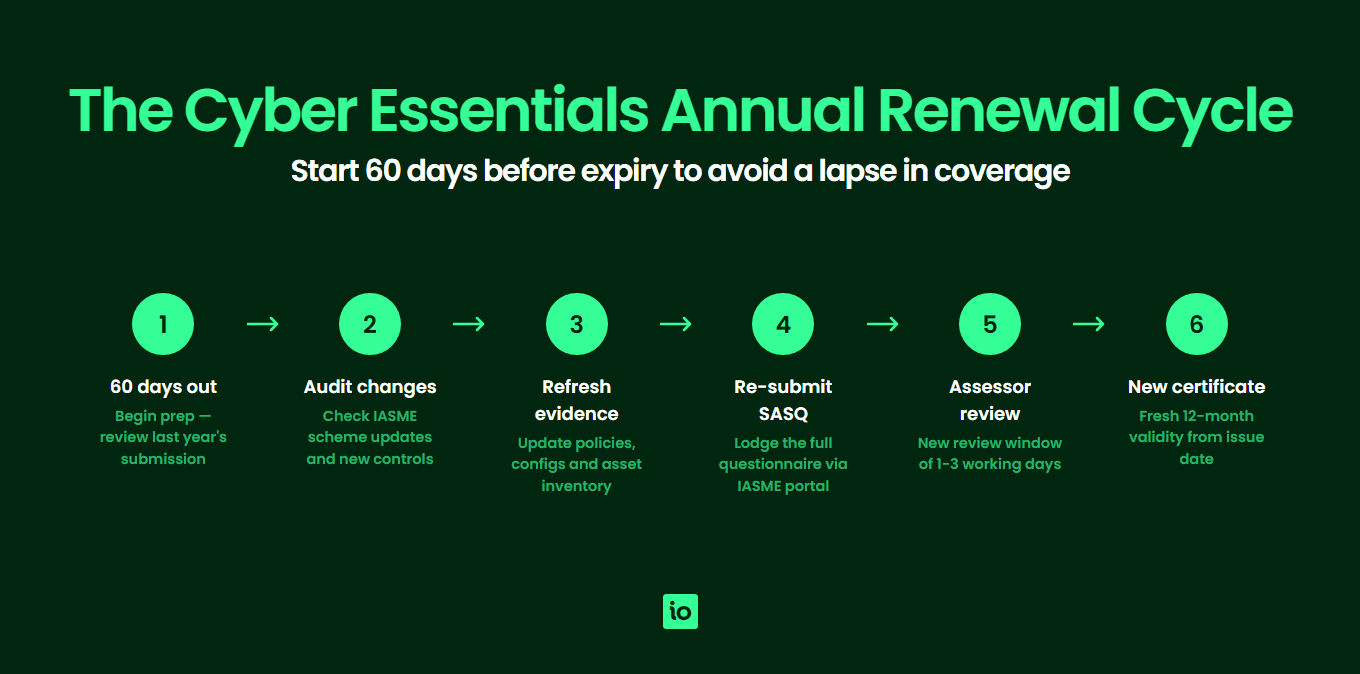
That cliff-edge expiry is deliberate. The threat landscape changes constantly, software vendors push out new vulnerabilities every month and the IASME Consortium (which administers the scheme on behalf of the NCSC) refreshes the technical requirements roughly once a year. A 12-month certificate guarantees that everyone displaying the mark has been assessed against a recent version of the standard, not a snapshot from three years ago. For buyers procuring services that touch personal data or government supply chains, that recency is the whole point of the scheme.
For most UK businesses, renewal is also a contractual and commercial requirement. If you supply central government, hold MOD contracts, work with the NHS or sit in a regulated supply chain, your customers will check the IASME certificate register to confirm your certificate is current. A lapsed certificate often means an immediate pause on new work, a flag on your supplier record and, in some cases, a breach of contract clause. Treating renewal as routine paperwork is risky — it should be planned, owned and resourced like the original certification project.
This page covers the full renewal picture: the 12-month validity rule, what changes year-on-year, the latest IASME control updates you need to be ready for, when to start preparing, and how to decide whether to step up to Cyber Essentials Plus at renewal time.
How does the 12-month renewal cycle actually work?
Cyber Essentials certificates are valid for exactly 12 months from the date the assessor confirms a pass. The expiry date is printed on your certificate, listed on the IASME register and emailed to your registered contact in the run-up to the deadline.
Renewing uses the same Cyber Essentials Self-Assessment Questionnaire (SASQ), the same Certification Body and the same assessor pool as a first-time application. You complete the current questionnaire in full, regardless of whether you certified last year. The label "renewal" is a billing and scheduling convenience, not a lighter-touch process — there is no shortened questionnaire or "same answers as last year" option for returning organisations.
What changes between year one and year two is what you have to answer about. Your scope may have grown, you will have onboarded new devices and software, cloud services may have moved, and the questionnaire itself will have been updated. IASME publishes a fresh version of the requirements roughly every April. If your renewal falls after that update, you answer against the new version — even if you certified to the old version 11 months earlier. That is why a clean copy of last year’s answers is useful as a starting point, but never sufficient as the final submission.
Most Certification Bodies will let you start your renewal submission up to 90 days before expiry. The clock on your new 12-month certificate starts from the date of the new pass, so submitting early does not shorten your year two coverage; it simply moves your expiry date forward by however many days early you certify.

Start your free trial
Want to explore?
Sign up for your free trial today and get hands on with all the compliance features that ISMS.online has to offer
What changes in the 2026 Cyber Essentials requirements?
IASME refreshed the technical controls underpinning Cyber Essentials in April 2026. The five control themes — firewalls, secure configuration, security update management, user access control and malware protection — remain the structural backbone of the scheme. What changes are the specifics within each theme: how MFA must be implemented, which device types are in scope, how cloud services and home working are treated, and the software support definitions that trigger an unsupported-software finding.
The table below summarises what is new in 2026 versus what carries over unchanged from the 2025 question set. Use it as a quick gap check before you start your renewal submission.
| Control area | What’s new in 2026 | Carried over from 2025 |
|---|---|---|
| Firewalls and boundary | Tightened wording on software firewalls for devices used outside the corporate network; explicit requirement to document any inbound rules with a business justification. | Default-deny inbound, change of vendor default passwords, dedicated administrative interface protection. |
| Secure configuration | Clearer expectations on disabling auto-run/auto-play across all in-scope devices, plus refined guidance on guest and Wi-Fi network segregation for home workers. | Removal of unnecessary software and accounts, device locking after 10 minutes of inactivity, brute-force protection on user accounts. |
| Security update management | Updated definition of "supported" software that explicitly captures vendor end-of-extended-support cliff dates and treats licence-locked legacy versions as unsupported. | 14-day patching window for high/critical CVEs, automatic updates where available, removal of unsupported software from scope or network. |
| User access control | MFA expansion: all cloud services (not just administrative ones) used by the organisation now require MFA for every user, with phishing-resistant methods recommended for administrators. Tighter rules on shared and service accounts. | Unique user accounts, formal user account approval process, separation of standard and administrative accounts, MFA on cloud admin access. |
| Malware protection | Sharpened wording on the three accepted approaches (anti-malware software, application allow-listing, sandboxing) and explicit requirement for mobile platforms to be covered. | Real-time scanning, signature/heuristic updates, web filtering or equivalent for in-scope devices. |
| Cloud service scope | Refined definition of cloud services in scope: any SaaS, PaaS or IaaS your organisation depends on for business operations must be covered, with clearer accountability for shared responsibility. | Office 365/Google Workspace style productivity suites, file storage and collaboration platforms in scope. |
| BYOD and home working | Tightened expectations for personally owned devices accessing corporate data — same five controls must be demonstrably applied, with practical guidance on MDM and conditional access. | Home working included by default, home routers excluded from scope, employee-owned devices in scope when used for work. |
| Questionnaire structure | Reworded questions for clarity, removal of duplicates, and improved branching logic so respondents only see relevant questions for their environment. | Five control themes, organisational and technical sections, sign-off by a board-level signatory. |
If you certified in 2025, the controls themselves have not fundamentally changed, but the wording has tightened and the MFA expectations have grown. The most common stumbling block at 2026 renewal is the broader MFA requirement on standard user accounts (not just admins) for cloud services. If your current rollout only covers admins, plan that work into your 60-day prep window before submission — rolling MFA out to the whole organisation usually takes longer than the technical configuration suggests.

Manage all your compliance, all in one place
ISMS.online supports over 100 standards and regulations, giving you a single platform for all your compliance needs.
When should you start preparing for renewal?
The honest answer is "earlier than you think". The single biggest cause of failed or rushed renewals is leaving the work until the last fortnight. A practical, low-stress approach is to start the renewal project 60 days before your expiry date. That gives you enough time to handle scope changes, MFA rollouts and software-support fixes without letting your certificate lapse.
60 days before expiry
Pull a copy of last year’s submitted SASQ, the current IASME question set and your asset and software inventories. Run a quick gap analysis against the updated controls. Identify any new locations, cloud services or device classes that have come into scope since you last certified.
30–45 days before expiry
Close any technical gaps: roll out MFA to standard users, remove or upgrade unsupported software, tighten firewall configurations, review and update your acceptable use and joiner/mover/leaver processes. Run an internal dry-run of the self-assessment questionnaire with the people who will sign it off.
14–21 days before expiry
Submit the SASQ to your Certification Body. Most assessments are returned within five working days, which leaves you a buffer for clarification questions or a request to fix and resubmit (which counts as a single assessment, not a fresh one, provided you respond within the same submission window).
Submission day onwards
Once you pass, your new certificate is issued the same day and the IASME register is updated. Update your website, supplier portals, tender documents and any contractual records that reference the certificate number or expiry date.
Should you move up to Cyber Essentials Plus at renewal?
Renewal is the natural moment to consider stepping up to Cyber Essentials Plus. The standard Cyber Essentials certificate is self-assessed and verified at desk-review level. Cyber Essentials Plus adds an independent, hands-on technical audit by your Certification Body covering vulnerability scans, device sampling and verification that the controls you claim are actually configured as described.
Three signals suggest now is the right time to move up:
- Customer pressure — a tender or supplier review has asked specifically for Cyber Essentials Plus, not just Cyber Essentials.
- Insurance leverage — your cyber insurance broker indicates a meaningful premium reduction or coverage uplift for Plus-certified organisations.
- Maturity signal — you have a year of operational data showing the controls work in practice and you want to evidence that externally.
The Plus assessment uses the same Self-Assessment Questionnaire as the foundation level, so the prep work is largely the same. The additional effort is hosting the technical audit (typically half a day to a day for a small organisation) and ensuring sampled devices are available and configured correctly on the day. See our Cyber Essentials Plus requirements page for a control-by-control breakdown of the audit, and our requirements guide for the underlying control detail that applies to both certificates. For the full line-by-line readiness work both routes share, see our Cyber Essentials checklist.
Why Choose ISMS.online for Cyber Essentials Renewal?
- Pre-mapped to the 2026 question set — ISMS.online tracks the current IASME question set so you assess against the latest requirements without rebuilding your own checklist each year.
- One platform for renewal evidence — collect, store and link evidence (firewall configs, MFA screenshots, patching records, asset registers) directly to the question it answers, so nothing is lost between year one and year two.
- Built-in gap analysis — compare your current state against the live IASME controls and surface the highest-priority gaps to close before submission.
- Owner-led action tracking — turn each gap into a task with a named owner, due date and status, so the 60-day prep window stays on track.
- Carry over from year one — reuse last year’s evidence and answers as a starting point, then update only what has changed, cutting prep time significantly.
- One place for multiple frameworks — if you also hold ISO 27001 or are working towards SOC 2 or NIS 2, ISMS.online maps overlapping controls so the same evidence supports multiple certifications.
- Trusted by thousands of UK organisations — ISMS.online supports compliance teams across the UK in managing recurring certifications without the spreadsheet sprawl.
Related Cyber Essentials guides
Continue your Cyber Essentials journey with the other guides in this series:
- Cyber Essentials Requirements — The five control areas, scope decisions and what evidence assessors look for.
- Cyber Essentials Cost — What drives Cyber Essentials cost, Plus pricing factors and how to budget.
- Is Cyber Essentials Worth It? — An honest assessment of the benefits, drawbacks and who actually needs certification.
- Cyber Essentials Plus Requirements — The technical audit, vulnerability scans and what Plus delivers over the basic certification.
- Cyber Essentials Self Assessment — The SASQ workflow, scope, evidence and common pitfalls.
- How Long Does Cyber Essentials Take? — Typical UK timeline, fast-track options and what slows the process.
- Cyber Essentials for Small Business — SMB-specific scope and the cost-benefit case.
- Cyber Essentials vs ISO 27001 — Scope, cost, time and recognition compared.
FAQs
How long is a Cyber Essentials certificate valid for?
A Cyber Essentials certificate is valid for exactly 12 months from the date the assessor confirms a pass. After that, the certificate expires and you can no longer claim certified status or display the trust mark until you complete a successful renewal.
How much does Cyber Essentials renewal cost?
Renewal fees are set centrally by IASME and scale with the size of your organisation. Because IASME reviews its pricing from time to time, check the current figures on the official IASME website before you budget. Moving up to Cyber Essentials Plus involves an additional assessment fee quoted separately by your chosen Certification Body.
What is the difference between Cyber Essentials renewal and a new application?
Renewing uses the same Self-Assessment Questionnaire, the same Certification Body and the same assessor pool as a first-time application, and you answer the current IASME question set in full, regardless of whether you certified last year. The "renewal" label reflects scheduling rather than a lighter-touch process.
When should I start preparing for renewal?
Start the renewal project 60 days before your expiry date. Use the first 30 days to assess against the current IASME question set and identify gaps, the next 15–30 days to close technical gaps (MFA, patching, firewall config) and the final 14–21 days to submit, allow for assessor questions and pass. Leaving the work to the last fortnight is the biggest single cause of failed or lapsed renewals.
Can I move up to Cyber Essentials Plus at renewal time?
Yes, and renewal is a natural moment to step up. Cyber Essentials Plus uses the same SASQ as the foundation level but adds an independent technical audit by your Certification Body. The audit verifies that the controls you claim are actually configured as described and typically takes half a day to a day on site or remotely. Plan in additional time and budget for the Plus assessment fee on top of your standard renewal fee.